Get notified when the washer finishes
Learn the washer’s own power pattern, remember when a real cycle starts, and send one alert after power stays at the finished level.
Best for: Washers whose electrical load can be observed safely and whose power pattern has a clear running and finished state.
Not for: An unverified inline smart plug, a shared circuit with combined readings, or a washer whose low-power cycle pauses look the same as its finished state.
Why this exists
Wet clothes are easy to forget when the laundry room is out of sight. A useful alert must distinguish a completed cycle from an idle machine, a fill pause, a delayed start, and a monitoring device that just reconnected.
The reliable pattern is stateful: prove that the washer was running before treating sustained low power as done.
Logic
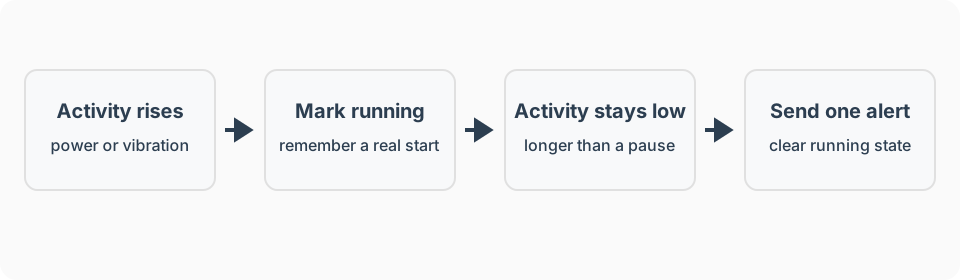
- Trigger: Measured power stays above the washer’s calibrated running threshold long enough to prove a cycle started.
- Conditions: Monitoring data is current and the washer was not already marked as running.
- Action: Mark the washer as running and clear any previous waiting-laundry state.
- Wait / timeout: After a real start, wait until power remains below the calibrated finished threshold longer than the washer’s longest normal low-power pause.
- Stop condition: Mark the cycle finished, send one notification, and set a waiting-laundry state.
- Manual override: A person can clear the waiting state without affecting the washer.
What I used
Observe washer power
Zooz ZEN15 Power Switch. This is the monitor I use on the washer. Read power only, keep the relay on, and check the washer nameplate against the switch rating before connecting it.
Clear the waiting-laundry state
A manual dashboard or phone action. A manual reset is better than an unreliable door sensor.
See recommended gear for the job-first checklist. Amazon product links on this page are affiliate links, and I earn from qualifying purchases. Product recommendations and the affiliate relationship are explained in the disclosure.
Setup notes
- Check the washer manual and nameplate before connecting any inline monitoring device.
- Configure the monitoring device as observe-only. Keep its relay on and exclude it from broad “turn everything off” routines.
- Record power through at least three complete cycles, including the modes the household actually uses.
- Identify a running threshold that standby noise never reaches.
- Identify a finished threshold and a delay longer than every low-power pause seen during a cycle.
- Create separate running and waiting-laundry states.
- Test with silent logging before enabling notifications.
- Enable one completion alert, then add a quiet reminder only if it is useful.
Platform notes
The platform must remember that a real cycle started before low power or stillness can mean finished. A single threshold rule is not enough. See the platform guides for the broader fit and maintenance tradeoffs.
Amazon Alexa
Prefer a washer integration that exposes a manufacturer-provided cycle-complete state. I could not verify power or vibration as universal Alexa routine triggers, so do not assume an arbitrary monitor can build this recipe in Alexa.
SmartThings
Use power or acceleration only when the device profile exposes that attribute. A simple Routine may cover a manufacturer-provided completion state; the two-stage running-then-idle inference is better suited to SmartThings Rules, where the state can be remembered, delayed, and checked again.
Hubitat
Hubitat Basic Rules supports acceleration and vibration triggers. For power thresholds or a remembered running state, use Rule Machine with a compatible driver that exposes current power. Keep the monitor observe-only and test several real cycles before enabling notifications.
Home Assistant
Home Assistant may be a technical fit for stateful power analysis, but I have not personally run it. Verify the monitor integration, electrical suitability, and current automation behavior independently.
Calibrate from evidence
Fixed internet thresholds are guesses. Build a small observation table for the actual washer:
| Observation | What to record |
|---|---|
| Idle before a cycle | Normal standby range |
| Fill and soak pauses | Lowest draw and longest duration during a real cycle |
| Agitate and spin | Typical active range |
| Finished | Stable draw after the controls settle |
| Monitor unavailable | How missing or stale data appears |
Choose thresholds with room between observed states. If there is no reliable gap, use a different sensing method rather than shortening the delay until false alerts appear.
Advanced features
Add one restrained reminder
Set a waiting-laundry state when the first alert is sent. If it is still set after a household-chosen interval, send one quiet reminder. Clear it manually or with a separately verified door sensor.
Respect quiet hours
Keep the completion event in history, but delay speaker announcements until daytime. A phone notification can remain silent overnight.
Show data health
Display unavailable or stale monitoring as unknown, not idle. Missing measurements must never count as a finished cycle.
Failure modes
- Alert arrives during a soak or fill pause: Lower the finished threshold, lengthen the delay, or use a different signal.
- No alert arrives: Confirm the running marker was set and that recent power reports continued through the end of the cycle.
- Alert arrives while the washer is idle: Require a sustained running state before completion can trigger.
- Duplicate alerts arrive: Clear the running marker atomically with the first completion alert.
- The monitoring device reconnects at zero watts: Treat unavailable-to-zero transitions as startup recovery, not completion.
- Someone turns off the monitoring plug: Restore power manually and remove the device from all remote shutoff routines.
- The monitor is not rated for the washer: Remove it. Use a properly rated monitor or have an electrician install circuit-level monitoring.
FAQ
What wattage means that my washer is finished?
There is no universal number. Observe several complete cycles, find the lowest normal running draw and the stable finished draw, then place the threshold between them.
Why must the automation remember that the washer was running?
The running marker prevents a completion alert every time an idle washer reports low power or reconnects after an outage.
Should the automation turn off the smart plug?
No. Use the device only for monitoring and keep its relay on. Do not remotely interrupt a washer cycle.