Turn lights on when a door opens
Open the closet or pantry, and the light comes on. If the automation is unavailable, the familiar wall switch still works.
Best for: Closets, pantries, linen cupboards, and utility spaces where opening one door clearly means someone needs light.
Not for: A shared room or exterior door where normal door traffic would make the light surprising. Use a motion or presence recipe when the door does not reliably mean someone entered the lit space.
Why this exists
The pantry or utility-room light should be on before anyone has to reach for the switch. A contact sensor sees the action that starts the task - opening the door - more decisively than a motion sensor in a small enclosed space. The physical switch remains the Level 1 fallback for guests, maintenance, and every failure mode.
Logic
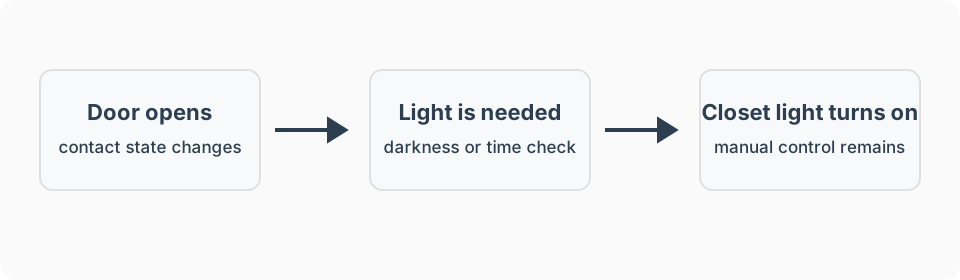
- Trigger: The contact sensor changes from closed to open.
- Conditions: The space is dark enough, or it is within the hours when automatic light makes sense.
- Action: Turn on the light at the desired brightness.
- Wait / timeout: None for turn-on. A separate close or timeout rule may turn it off later.
- Stop condition: A manual wall-switch change is an explicit choice and should not be immediately reversed.
- Manual override: The wall switch still wins.
What I used
Detect an open door
SONOFF SenseGuard Gen2 Zigbee contact sensor. Test the closed state before relying on it.
Dim a fixed light
TP-Link Tapo S505D Matter Smart Dimmer Switch. Verify hub compatibility. Keep the physical paddle usable.
Switch a fixed light on or off
Leviton DG15S Zigbee switch. Keep the physical paddle usable.
See recommended gear for the job-first checklist. Amazon product links on this page are affiliate links, and I earn from qualifying purchases. Product recommendations and the affiliate relationship are explained in the disclosure.
Setup notes
Mount and test
- Mount the magnet and sensor where the door closes consistently.
- Open and close the door ten times and confirm every state change appears in the hub.
Start simply
- Turn the light on when the door opens.
- Add a light-level condition only after the basic trigger is reliable.
Choose a safe off rule
- For a closet, turn off after the door is closed for one minute.
- For a pantry, start with a longer delay so it does not turn off during a quick return trip.
Platform notes
The reusable requirement is that the platform receives a reliable open or closed state and can command the light without disabling its physical control. See the platform guides for the broader fit and maintenance tradeoffs.
Amazon Alexa
Use an Alexa routine only when the contact sensor appears as an open-state trigger under When. Amazon defines open and closed reporting through its contact-sensor interface, but an individual integration still decides whether that state is available to routines.
SmartThings
Create an automatic SmartThings Routine with contact open as the IF condition and light on as the THEN action. Use a complementary close or delayed-off routine only after the open action is dependable. The available choices come from the device’s exposed SmartThings capabilities.
Hubitat
Use Hubitat Room Lighting for contact activation and override-aware off behavior. Basic Rules is sufficient when the job is simply open, turn on; closed for a delay, turn off.
Home Assistant
I have not personally run Home Assistant. Treat it as a technical-fit option and adapt the same contact-state logic only after checking the current integration for the exact sensor and switch.
Advanced features
Day vs. night brightness
Adjust brightness based on time of day:
- Nighttime (10 PM - 6 AM): 30% brightness, warm white (2200K)
- Daytime: 100% brightness
Auto turn-off when door closes
Turn off light 2 minutes after door closes:
- Prevents lights turning off while door swings closed
- Avoids rapid on/off cycles during multiple trips
- Still energy efficient
Failure modes
- The light does not turn on: Check that the contact sensor reports open in the hub, then confirm the automation uses that exact entity.
- The light turns on at random: Realign the magnet and sensor. A door that flexes or a loose adhesive mount can briefly report open.
- The light turns on during the day: Add a light-level condition or limit the automation to the hours when the space is normally dark.
- The light turns off while someone is using the space: Increase the close delay. Do not use an instant off rule for a pantry or a space with more than one door.
- The hub or internet is down: The physical wall switch remains the fallback. Verify local behavior before depending on it.
FAQ
Should the light turn off as soon as the door closes?
Only for a small closet where the light is visible from outside. For a pantry or room, use a short delay and keep the wall switch as the immediate fallback.
Why does the light turn on when nobody is using the closet?
Check magnet alignment and make sure the sensor reports closed reliably. A loose sensor or a door that flexes can create false open events.
Can this work when the internet is down?
It can when the hub and devices support local automation. Regardless, the physical wall switch should always work normally.