Turn on the bathroom fan when a shower starts
Turn the bathroom fan on when the shower light goes on or humidity rises, and turn it off once the bathroom has stayed dry for a while.
Best for: A bathroom fan on a smart switch and either a shower light or a humidity sensor that can trigger it reliably.
Not for: A shared circuit where the fan cannot be switched independently of the light, or overnight hours unless the household wants ventilation running while sleeping.
Why this exists
A fan that only runs when someone remembers to flip the switch does not help with mirror fog or lingering humidity. Tying the fan to an existing shower signal, whether the light or a humidity reading, removes the need to remember, and turning it off automatically once humidity settles avoids a fan running long after the shower ends.
?? If motion is part of the trigger, see how to place motion sensors for reliable automations before mounting the sensor.
Logic
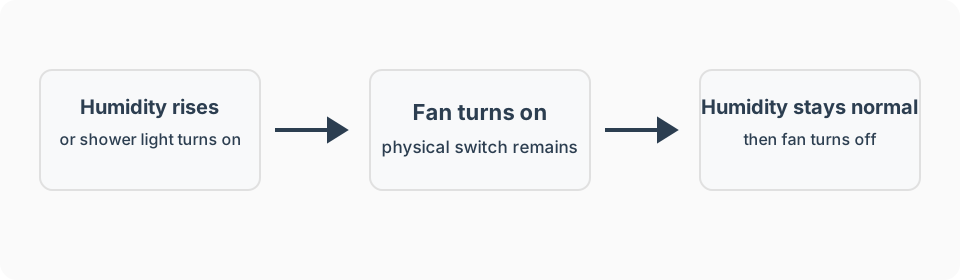
- Trigger: The shower light turns on, or bathroom humidity rises above its calibrated baseline.
- Conditions: The time falls within the household’s normal waking hours, unless overnight ventilation is specifically wanted.
- Action: Turn on the bathroom fan.
- Wait / timeout: Keep the fan running until the trigger clears and stays clear for several minutes.
- Stop condition: The light turns off, or humidity drops back to baseline, for the confirmation period.
- Manual override: The physical wall switch always works regardless of the automation.
What I used
Detect bathroom motion with humidity, temperature, and light
Aeotec TriSensor 8. Use this for the humidity-based trigger, not for the fastest motion response.
Switch the bathroom fan independently
No personally verified recommendation yet. Confirm any smart switch used here is rated for the fan motor’s load and that the physical wall switch keeps working.
See recommended gear for the job-first checklist. Amazon product links on this page are affiliate links, and I earn from qualifying purchases. Product recommendations and the affiliate relationship are explained in the disclosure.
Setup notes
- Choose one primary trigger, either the shower light or a humidity sensor, and treat the other as a backup rather than combining them in a way that confuses troubleshooting.
- Record the bathroom’s humidity baseline on a normal day with no shower running.
- Set the on-threshold clearly above that baseline so normal humidity swings do not start the fan.
- Require the trigger to clear for several minutes before turning the fan off, so a brief pause in the shower does not shut it off early.
- Restrict the automation to normal waking hours unless the household wants it running overnight.
- Test with an actual shower, not just running the sink, before trusting the thresholds.
Platform notes
The important platform capability is not a generic “shower detected” event. It is a current humidity or light state, a fan command, and separate on and off thresholds. See the platform guides for the broader fit and maintenance tradeoffs.
Amazon Alexa
Alexa can control compatible fans, but humidity as a routine trigger depends on the device integration and was not verifiable as a universal option. Use this recipe in Alexa only if the exact humidity sensor appears under When and the fan control appears under Alexa Will.
SmartThings
When the sensor exposes humidity, use a greater-than threshold to start the fan and a lower threshold to stop it after a confirmation delay. Device options depend on the exposed SmartThings capabilities; advanced Rules can express the separate thresholds and waits more explicitly.
Hubitat
Hubitat Basic Rules supports humidity thresholds and delays. Use separate on and off thresholds to prevent rapid cycling. A rapid-rise or multi-sensor shower inference belongs in Rule Machine rather than being treated as a built-in shower detector.
Home Assistant
I have not personally run Home Assistant. Treat it as a technical-fit option and verify the current humidity sensor and fan integrations before adapting the thresholds.
Advanced features
Fixed maximum run time
Add a maximum run time, such as 30 minutes, so a stuck sensor or an unusually long humid period cannot leave the fan running indefinitely unnoticed.
Combine light and humidity
Where both are available, use the light as the immediate on-trigger and the humidity reading only to extend the off-delay on longer showers.
Failure modes
- Fan does not turn on: Confirm the trigger source is reporting current data and that the fan switch responds to a manual test.
- Fan turns on for unrelated reasons: If using humidity, raise the threshold or confirm nothing else in the bathroom (kettle steam, an open window on a humid day) is triggering it.
- Fan does not turn off: Confirm the off-condition requires both the trigger and a sustained clear period, and check for a stuck humidity reading.
- Fan runs at night unexpectedly: Add or correct the waking-hours condition.
- Physical switch stops working: Reconnect or replace the smart switch; the wall control must always be usable.
FAQ
Which trigger is more reliable, the light switch or humidity?
A light-based trigger is simpler and more reliable, since the light almost always goes on first. A humidity sensor is more accurate about the shower itself but reacts a little later and needs its own calibration.
Why not just leave the fan on a timer?
A fixed timer either wastes electricity by running too long or shuts off too early on a long shower. Tying the fan to the actual trigger and humidity level fits real use better.
Should the fan run overnight?
Restrict it to normal waking hours unless the household specifically wants ventilation overnight, since a fan running unexpectedly at night can be startling.