Get notified when the garage door is left open
Send a notification when the garage door has been open longer than expected. This recipe alerts only; it does not close the door.
Best for: A garage door with a sensor or smart controller that reports open and closed status to the platform.
Not for: A garage door with no way to report its state; a sensor or smart controller has to be added first. Also not for anyone looking for automatic closing; see close a garage safely after an open-door alert for that, and its required precautions.
Why this exists
A garage door left open is an easy thing to forget about, whether it was left open while unloading a car or simply overlooked before bed. A notification after it has been open longer than expected catches this before it becomes a security or weather problem, without moving the door on its own.
Logic
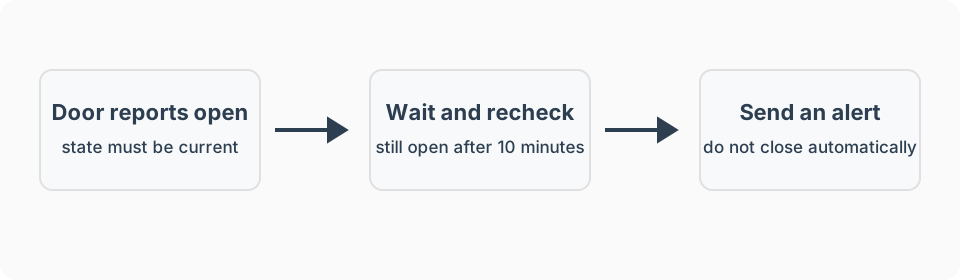
- Trigger: The garage door sensor reports “open” and stays in that state for a set duration, such as 10 minutes.
- Conditions: The door is still open at the time the duration elapses.
- Action: Send a notification stating how long the door has been open.
- Wait / timeout: None beyond the initial delay; this recipe does not attempt to close the door.
- Stop condition: The door being closed manually clears the alert.
- Manual override: The garage door opener’s physical button and any app-based control remain available at all times and are the only way this recipe expects the door to close.
What I used
Know whether a garage door is open
THIRDREALITY Zigbee Smart Garage Door Tilt Sensor. Reports open and closed state without replacing the existing garage door opener. It reports door position only, not whether the doorway is clear.
See recommended gear for the job-first checklist. Product recommendations and any future affiliate relationships are explained in the disclosure.
Setup notes
- Install a tilt sensor on the garage door, or confirm an existing smart garage controller already reports open and closed state to the platform.
- Set a delay before the first notification, such as 10 to 15 minutes, to allow for normal use like loading or unloading a car.
- Add a separate, shorter-delay check tied to a fixed nighttime cutoff, such as 10:00 PM, so an open door at bedtime gets flagged even if it was opened well before the standard delay.
- Test both automations by leaving the door open deliberately and confirming the timing and notification content are correct.
- If closing the door automatically is wanted, do not build it into this recipe; use close a garage safely after an open-door alert instead, which covers the required entrapment protection and warnings.
Platform notes
Keep this as an alert-only rule on every platform. An open-state notification does not prove the doorway is clear or make unattended closing safe. See the platform guides for the broader fit and maintenance tradeoffs.
Amazon Alexa
Some garage integrations report open and closed state to Alexa, but I could not verify a universal consumer-routine option for “remains open for 10 minutes.” Confirm that the exact controller exposes both the state and required timing behavior before depending on Alexa for this alert.
SmartThings
Use door open as the IF condition. For a dependable left-open alert, an advanced SmartThings Rule can wait and then check that the door is still open instead of sending an unconditional delayed notification.
Hubitat
Hubitat Basic Rules and the Notifications app support alerts after a condition remains true for a specified duration. Closing the door before the duration expires should cancel the pending alert.
Home Assistant
I have not personally run Home Assistant. Adapt the same open-for-duration and recheck pattern only after verifying the exact garage-state integration.
Advanced features
Escalating notifications
Send a standard notification at 10 minutes, a stronger reminder at 30 minutes, and a high-priority alert after an hour, so a persistently open door is harder to keep ignoring.
Failure modes
- Sensor reports the wrong state: Recheck a tilt sensor’s mounting angle, or a contact sensor’s magnet alignment; also check the battery.
- Notifications do not arrive: Confirm notification permissions for the platform’s app and that the automation itself is enabled.
- Too many repeat notifications: Increase the delay before the first alert, or switch to escalating notifications instead of repeating the same message.
- Sensor reports unavailable: Treat this as unknown status, not as closed, and still alert if the last known state was open.
FAQ
How long should the garage door be open before I get a notification?
Around 10 to 15 minutes works well for normal daytime use, such as loading a car. A shorter window, such as 5 minutes, makes sense at night or while the home is in Away mode.
Does this automation close the garage door?
No. This recipe only alerts. Closing stays with the normal wall control and remote, or with a complete opener and controller system explicitly designed and approved for unattended closing, as described in the paired garage-auto-close recipe.
What if I have more than one garage door?
Set up a separate automation per door, since each can have its own sensor, its own typical usage pattern, and its own appropriate delay before alerting.