Turn lights on when you walk in
Walk in, lights on. If that fails at 2am, the wall switch still works.
Best for: Hallways, closets, entryways, laundry rooms, and bathrooms with a sensor that sees the door.
Not for: A room where people sit still for long periods, or a bathroom with a short PIR timer. A PIR is best for detecting entry motion. Use a longer timeout and the PIR vs mmWave presence article where the automation must know that someone is still in the room.
Why this exists
Nobody should have to fumble for a switch with a basket of laundry or explain the light system to a guest. The first detection needs to happen before a hand reaches the wall control. Keep the switch useful so the room remains ordinary when the hub, sensor, or internet is not.
Logic
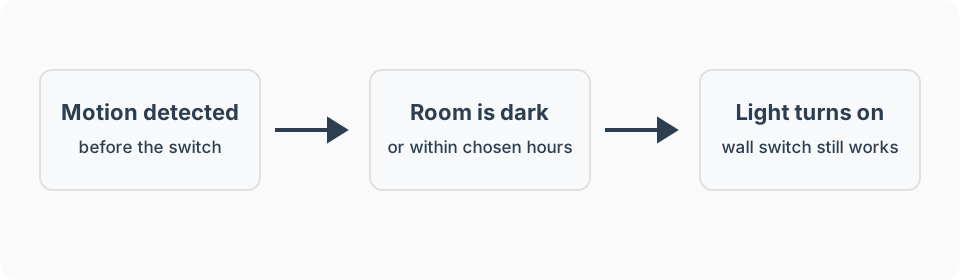
- Trigger: The entry sensor changes from clear to motion detected.
- Conditions: The room is dark enough, or it is within the hours you want automatic light.
- Action: Turn on the light. Use a dim level at night if the light supports it.
- Wait / timeout: None for turn-on. The paired turn lights off after motion stops recipe owns the timeout.
- Stop condition: A manual wall-switch change should prevent the off recipe from undoing the person’s choice.
- Manual override: The wall switch still wins.
What I used
Detect fast entry motion
Shelly BLU Motion ZB. Mount it where it sees the approach to the doorway.
Dim a fixed light
TP-Link Tapo S505D Matter Smart Dimmer Switch. Verify hub compatibility. Keep the physical paddle usable.
Switch a fixed light on or off
Leviton DG15S Zigbee switch. Keep the physical paddle usable.
For a bathroom that needs humidity, temperature, and light readings too, use the Zooz ZSE11 800LR Q Sensor instead. It is not my first choice when the fastest motion response is the job.
See recommended gear for the job-first checklist. Amazon product links on this page are affiliate links, and I earn from qualifying purchases. Product recommendations and the affiliate relationship are explained in the disclosure.
Setup notes
Start with only the trigger and light action. Once that is reliable, add the daylight condition and any night brightness adjustment.
- Daytime: Leave the light off when daylight is sufficient.
- Evening: Use the brightness that makes the room useful.
- Deep night: Start at 10 to 20 percent and raise it only enough for safe navigation.
Platform notes
I have used Alexa, SmartThings, and Hubitat, but the exact sensor and light still have to expose the required trigger and command to that platform. See the platform guides for the broader fit and maintenance tradeoffs.
Amazon Alexa
Build an Alexa motion-light routine only when the sensor appears as a motion trigger under When and the light appears as an action under Alexa Will. That path normally depends on the device integrations reporting state changes through Alexa’s cloud, so keep the wall switch available and test internet loss. Amazon documents the underlying motion-sensor state model, but available routine options still vary by device and region.
SmartThings
Use an automatic SmartThings Routine with motion as the IF condition and the light as the THEN action. Add time, illuminance, mode, or switch-state conditions only when the devices expose those capabilities. SmartThings explains the IF and THEN routine model; local execution still depends on every device feature and service in the rule supporting it.
Hubitat
Hubitat’s Room Lighting app is the natural starting point for motion activation, delayed turn-off, conditions, and overrides. A Basic Rule also works for a simple motion-on action. Keep the turn-off behavior separate until entry detection is reliable.
Home Assistant
Home Assistant is a technical fit for this pattern, but I have not personally run it. Use the platform-neutral trigger, darkness condition, action, and override described here, then verify the current implementation in official Home Assistant documentation rather than treating this as a tested walkthrough.
Advanced features
Add one brightness adjustment only when normal use shows that a single level is uncomfortable. Use a light-level condition when fixed hours turn the light on unnecessarily during bright days. In a larger room, add another sensor only to cover a measured blind spot rather than trying to track people between zones.
Failure modes
- The light turns on after someone reaches the switch: Move the sensor to see the entry path earlier and keep the path local.
- It turns on in daylight: Add a light-level condition, then test it on a bright overcast day as well as at night.
- A guest stands still after the light turns on: This recipe should be paired with a conservative off timeout. Use presence sensing where stillness is normal.
- The sensor is hidden or affected by steam: Keep it clear of towels, furniture, vents, and the shower plume.
- The hub or internet is down: The physical switch remains the fallback. Verify any Level 2 automation is local before depending on it.
FAQ
Why do motion lights turn on too slowly?
Put the sensor where it sees someone before they reach the switch, and keep the automation local where the platform supports it.
Should motion lights turn on during the day?
Usually no. Add a light-level condition or restrict the recipe to the times when the room is normally dark.
What happens when the internet is down?
A local hub and compatible devices can keep the automation running, but the physical wall switch must work either way.
Related recipes
- Why motion lights turn off while you are still there
- Lights turning on by themselves
- Control several lights from one physical button or switch
- Turn lights off after motion stops
- Bathroom night light
- Lighting automations
- Turn lights on when a door opens
- Motion sensor placement guide
- Smart bulbs vs. smart switches after a power outage
- Set up gradual wake-up lighting